
World clock & weather0.45 - Google Play
You'll be able to see results in few seconds.
Publisher Description
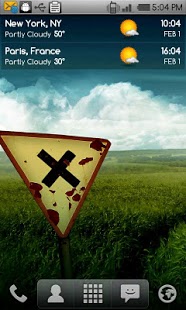
A full featured, world clock widget available in 4x1 and 4x2 sizes. The widget supports an unlimited number of locations and will display local times, current weather conditions and weather forecast.
The widget features the following:
- 7 different skins to choose from (more skins coming in the future)
- 4 weather icon skins
- Works in portrait or landscape mode
- 12 or 24 hour clock with date
- Detailed weather forecast display including the following:
- Local time
- Sunrise and sunset time for current location
- Humidity and wind conditions
- Current condition, temperature and low and high temperatures
- Current condition icon
- Last weather update time
- 4 day weather forecast
- Unlimited number of locations; enter all your favorite locations and easily keep track of the current time and weather conditions
The widget can be fully customized with the following options:
- Choose the widget and weather icon skins
- Choose the text color for the time, am/pm indication, date, location, current weather condition and current temperature
- Display 12 or 24 hour time with optional AM/PM indicator (if 12 hour format)
- Beep every hour (optional)
- Select the date display format
- Optionally show or hide specific elements of the widget (weather icon, date)
- Display temperature values in Celsius or Fahrenheit
- Select automatic weather refresh period (15 minutes, 30 minutes, 1, 2, 3, 4 or 6 hours)
- Enter your favorite world locations to watch local times, current weather conditions and weather forecast information
- Update weather on WiFi and/or GPRS
- Choose whether you want to update while roaming or not
- Play notification sounds on location and weather changes and updates
- Select alternate weather forecast service (MSN) - default is Google
IMPORTANT!!!
- This is a widget, not an application. To install it please refer to the help display when you run it. There is also a link to a video that shows you how to install it.
- If you are using a task killer exclude the widget from it
About World clock & weather
The company that develops World clock & weather is Droid27. The latest version released by its developer is 0.45.
To install World clock & weather on your Android device, just click the green Continue To App button above to start the installation process. The app is listed on our website since 2014-08-07 and was downloaded 0 times. We have already checked if the download link is safe, however for your own protection we recommend that you scan the downloaded app with your antivirus. Your antivirus may detect the World clock & weather as malware as malware if the download link to com.droid27.worldclockweather is broken.
How to install World clock & weather on your Android device:
- Click on the Continue To App button on our website. This will redirect you to Google Play.
- Once the World clock & weather is shown in the Google Play listing of your Android device, you can start its download and installation. Tap on the Install button located below the search bar and to the right of the app icon.
- A pop-up window with the permissions required by World clock & weather will be shown. Click on Accept to continue the process.
- World clock & weather will be downloaded onto your device, displaying a progress. Once the download completes, the installation will start and you'll get a notification after the installation is finished.
Version History
version 0.45
posted on 2014-08-07
version 0.41
posted on 2012-10-22
Several fixes and updates
Disclaimer
Official Google Play Link
We do not host World clock & weather on our servers. We did not scan it for viruses, adware, spyware or other type of malware. This app is hosted by Google and passed their terms and conditions to be listed there. We recommend caution when installing it.
The Google Play link for World clock & weather is provided to you by apps112.com without any warranties, representations or guarantees of any kind, so access it at your own risk.
If you have questions regarding this particular app contact the publisher directly. For questions about the functionalities of apps112.com contact us.
